App guides / Cutaway
How to learn from interactive diagrams in Cutaway
Start by asking what a mechanism changes, predict what will happen, then operate the diagram and explain the result in your own words. Cutaway pairs an interactive drawing with Simple and Technical explanations and sources. Use each part to answer a specific question, then return to the review questions to check what you remember.
Start with a question you can test
An animated diagram is easier to follow when you are looking for something specific. Before touching a control, turn the topic into a question: “Which part moves?”, “What changes when I turn this up?” or “Where does the energy go?”
Cutaway is built around short explanations of everyday things. Each explainer combines an interactive diagram, a Simple explanation, a Technical explanation and sources. Those are different ways into the same topic. You do not need to read everything at once, and moving a control is only useful if you notice what it changes.
This guide describes a practical reading routine for the app’s current design. Choose a pace that lets you explain the idea in your own words.
Observe the drawing before operating it
Spend a moment identifying the main parts. Look for labels, arrows and anything that appears adjustable. Try to name the input, the process and the outcome. If a label is unfamiliar, read enough of the Simple explanation to give it meaning before continuing.
For a zipper, your question might concern how the slider brings the two sides together. For a heat pump, it could be how the system moves heat between indoors and outdoors. These questions are small enough to test against a diagram and specific enough to reveal what you do not yet understand.
Avoid treating every moving shape as a literal representation of size or speed. A diagram is a model chosen to explain a mechanism. The accompanying text and sources help you understand what the model includes and what it leaves out.
Predict, interact, then compare
Before moving a control, make a short prediction. Say what you expect to happen and why. Then operate the diagram, watch the relevant parts and compare the result with your prediction.
Use this 4-step loop:
- Ask: choose one relationship you want to understand.
- Predict: state what you expect before you touch the control.
- Interact: change one thing and watch the response.
- Explain: describe what changed and whether it matched your prediction.
If the result surprises you, that is a useful place to read. Return to the explanation looking for the missing relationship, rather than replaying the animation until it simply looks familiar. If the control changes several parts at once, follow one part through the sequence first.
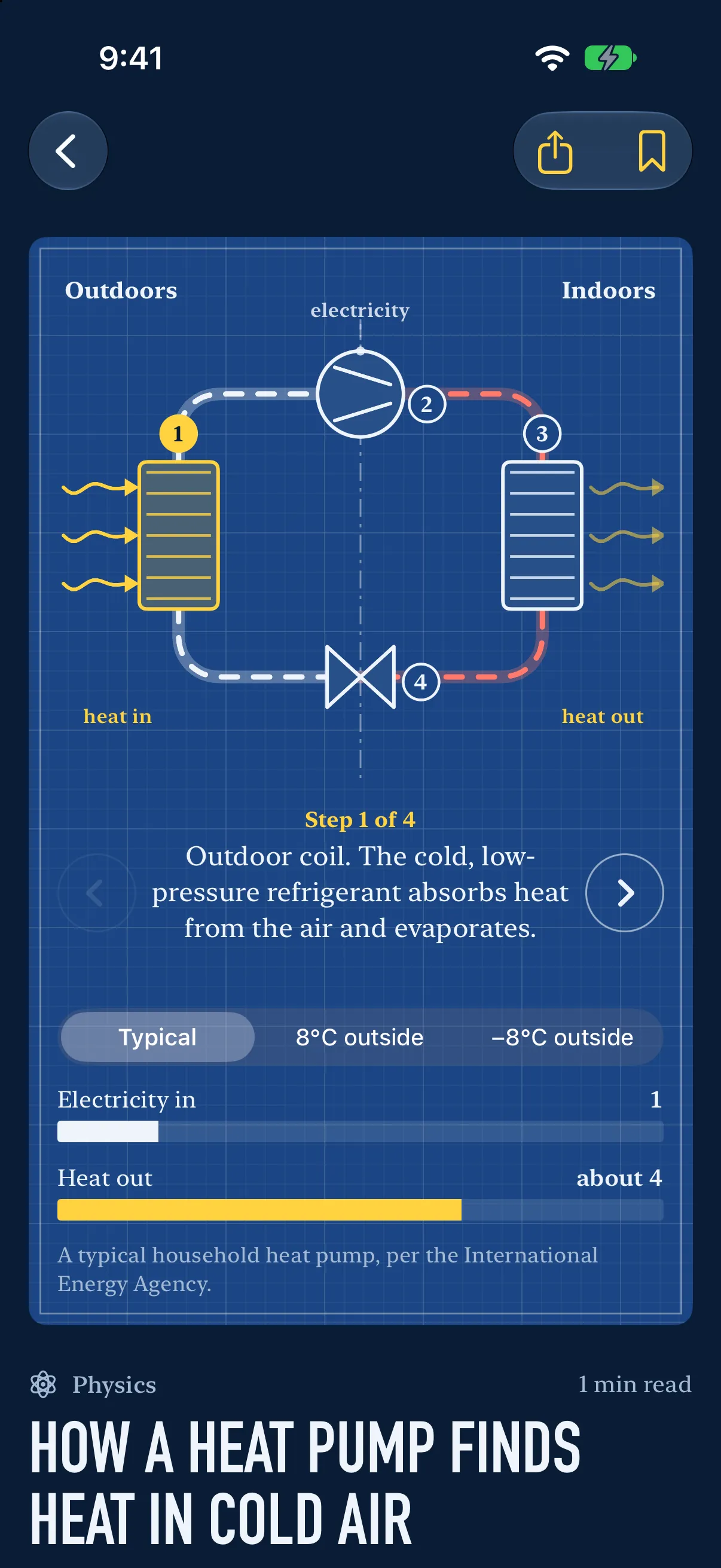
A worked example: reading the heat-pump explainer
Start with the everyday question in the screenshot: how can a heat pump find heat in cold air? Read the opening explanation and identify what the drawing says is being moved. Keep a distinction between moving heat and generating heat directly.
Next, choose a control that the displayed diagram actually offers. Before changing it, predict which visible part of the cycle should respond. Operate it and trace the labelled route. If your prediction was wrong, describe the difference in plain words: “I expected this part to change first, but the diagram shows the other stage changing.” That sentence gives you a precise reason to consult the text.
Now try a short explanation without looking: “The system uses work to move heat from one place to another.” The International Energy Agency’s explanation of how a heat pump works develops that distinction. Use the Technical explanation to refine the terms and understand the stages shown in that particular explainer. Follow its sources when you need details beyond the illustrated model.
The important output of this exercise is your explanation, including any question still unanswered. You do not need to guess a technical detail that the drawing does not show.
Use Simple and Technical for different questions
The Simple version gives you a first route through an idea. Read it when you need the overall mechanism or a plain-language account of why something happens. The Technical version is useful when you want more precise terms or need to resolve a detail that the first account compresses.
| What you are trying to do | Where to start | What to do next |
|---|---|---|
| Understand the overall idea | Simple explanation | Describe the mechanism in 1–2 sentences |
| Follow a moving part | Diagram | Predict a change, then test it |
| Resolve an unfamiliar term | Technical explanation | Connect the term to a labelled part |
| Check a claim | Sources | Read the underlying material and its scope |
| Check what you remember | Review questions | Explain the answer before returning to the text |
Switch between the layers when you have a reason. Reading the technical version first is fine if you already know the topic; reading it last is fine if you need the broader picture first. The useful test is whether the added detail helps you answer your original question.
Read sources and report specific errors
Cutaway shows sources with its explanations. Use them when a claim seems surprising, when you need more detail, or when you want to distinguish a simplified model from a real-world exception. A source link is an invitation to check the claim, not a substitute for reading it.

If you think an explainer is wrong, use Report an error in this pill at the end. That opens an email identifying the explainer. Include the particular statement or diagram behaviour you question and, where possible, a source that explains the discrepancy. A specific correction is easier to investigate than “this is inaccurate.” Review the email before sending it.
Return to the question after a break
Cutaway includes review questions that return over time. When one appears, try answering before reopening the explanation. If you cannot explain the relationship, revisit the relevant part of the diagram and make a new prediction. Remembering the layout of a screen is different from explaining what it represents.
Save explainers you want to revisit. A small set of questions you can explain clearly is a useful stopping point; you do not have to clear the entire library in one sitting. The daily explainer is a starting point for curiosity rather than a requirement to consume more content.
Questions about the reading routine
Do I need technical knowledge first?
Start with the Simple explanation and use the diagram to identify the parts. If a term is still unclear, keep that as your next question instead of trying to memorise a definition without context.
Can I use Cutaway on Android?
The current product is planned for iPhone and iPad. Check the Cutaway product page for availability; this guide does not announce an Android version.
Where are my reading history and review answers kept?
The Cutaway privacy policy describes the on-device reading history, saved explainers and review schedule. It also explains content downloads, reminders and the information included when you choose to send feedback.